Track SEO Rankings with Google Analytics

So, there are many ways to tracking keyword rankings. There are paid tools like Web Position-which was recently blocked by Google for a short period. There are free tools like Exact Factor - but the tool is limited to 9 keywords it can track. Market Samurai, one of the hottest SEO tools available is also a viable option for tracking keyword rankings. Because of these reasons as well as others, it makes sense to track rankings at the source - Google Analytics. I originally found the idea behind tracking seo rankings with google analytics at Yoast.com but decided to repost with some additional detail based on the questions I had while trying to implement.

So, the first steps are to setup a filter in Google Analytics. There will be a total of 3 filters needed to implement this Google Analytics SEO tracking. Filter 1 and 2 will take care of filtering out everything other than organic traffic. The 3rd will provide the tracking filter. This is important: you will also have to create a new profile to apply these filters to otherwise it will screw up your main profile's tracking! Now, onto the filters!

Filter 1: Google Analytics SEO Keyword Tracking

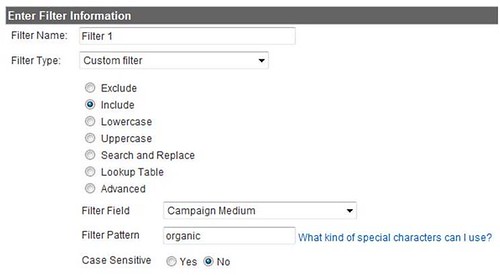
This filter will allow only Organic traffic into the profile. Create a new filter, choose filter type "custom filter". Then choose the "include" option, set the filter field on "Campaign Medium" and the filter pattern on "organic". A screenshot is below:

Filter 2: Google Analytics SEO Keyword Tracking


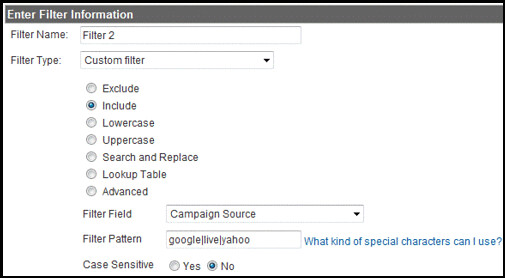
The second filter tells Google Analytics to capture traffic from Google, Yahoo and MSN. Create a new filter, choose filter type "custom filter". Then choose the "include" option, set the filter field on "Campaign Source" and filter pattern on "googleliveyahoo".


Tracking SEO Keyword Rankings with Google Analytics

Filter 3: Google Analytics SEO Keyword Tracking


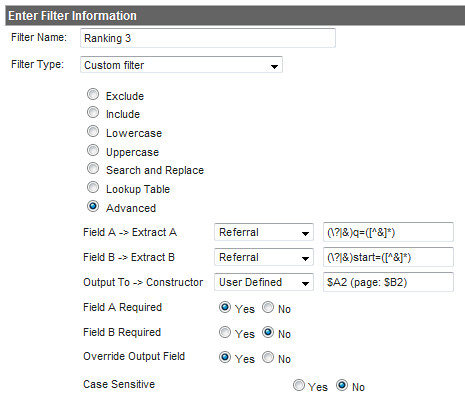
Set up the 3rd filter as an advanced filter like so-->

Google Analytics Tracking SEO Rankings
The SEO Keyword Ranking Results:

After a while the "User Defined" report will look like this (ignore the language):

Track SEO Rankings With Google Analytics
What you see are not the actual rankings, but the number of the first result of the page the keyword was on. So when you see 20, it means the keyword was on the third page, and a 50 means the sixth page. (Yahoo and Live Search will report 21 and 51 in stead of 20 and 50).
There were a number of questions in the comments surrounding about not seeing a number but only "(page: ): it means the keyword was on the first page - a good thing:)
Got any additional tips? Suggestions? Share in the comments!

Quick & Easy SEO Tips to Improve Your Website Ranking

Google recently posted quick and easy tips for the holiday rush and, after reading back over it, I quickly realized, these tips aren't just for the holiday season nor should they be recommendations limited to Google search.

As a result, I have compiled a list of quick and simple tips for websites to increase traffic - whether it's to make the sale online or to increase foot traffic to your brick-and-mortar location, your web presence is a critical part of your business plan. The tips below are fast, free, and can make a big difference in your organic SEO! Best of all, they were inspired by Google:)

Verify that your site is indexed (and is returned in search results)
Check your snippet content and page titles with the site: command [site:example.com] -- do they look accurate and descriptive for users? Ideally, each title and snippet should be unique in order to reflect that each URL contains unique content. If anything is missing or you want more details, you can also use the Content Analysis tool in Google's Webmaster Tools. There you can see which URLs on your site show duplicate titles or meta descriptions.

Label your images accurately
Don't miss out on potential customers with poor or missing alt text. Good 'alt' text and descriptive filenames help search engines better understand images, make sure you change non-descriptive file names [001.jpg] to something more accurate [NintendoWii.jpg]. Image Search has the potential to send significant search traffic, so you should take advantage of it.

Know what the search engines know (about your site)
Check for crawl errors and learn the top queries that bring traffic to your site through Webmaster Tools. You can use Google's diagnostics checklist or MSN's crawl issues tool to aid in this process.

Have a plan for expiring and temporary pages
Make sure to serve accurate HTTP status codes. If you no longer sell a product, serve a 404. If you have changed a product page to a new URL, serve a 301 to redirect the old page to the new one. Keeping your site up-to-date can help bring more targeted traffic your way and provide an overall more useful visitor experience.

Increase foot traffic too
If your website directs customers to a brick-and-mortar location, make sure you claim and double check your business listing in Google Local, Local.com, MSN's Local Listing and Yahoo Local.

Usability 101
Test the usability of your checkout process with various browswers and ensure the coding is valid. Ask yourself if a user can get from product page to checkout without assistance. Is your checkout button easy to find?

Tell the search engines where to find all of your web pages
If you upload new products faster than the search engines crawl your site, make sure to submit a sitemap and include 'last modification' and change frequency' information. A Sitemap can point searchbots to your new or hard-to-find content. Both Google's webmaster tools, MSN webmaster central and Yahoo!'s Site Explorer allow for sitemap submissions. You can read a quick question and answer on Google sitemaps for more details. Additionally, be sure to utilize robots.txt to funnel the search bots to content you want crawled and content that should not be indexed.

So, that's all for now. I know there are many, many more tips but these should help capture some low hanging fruit. Have your own tips? Feel free to add them in the comments section!

Be sure to check out PPC For Hire's SEO Basics series on Title Tags, Meta Description, Hx tags and Link Building.
SEMPO Rings NASDAQ Opening Bell

The Monday after Thanksgiving, otherwise known as Cyber Monday (which I blogged about in my Holiday Retail Strategies) I had the pleasure of joining the Search Engine Marketing Professional Organization (SEMPO) Chairwoman Dana Todd and about 25 other fellow New York SEMPO members to help ring the opening bell for NASDAQ. Included below is footage of the NASDAQ studio in New York’s Times Square, as well as exclusive interviews with Dana and SEMPO spokesman Greg Jarboe courtesy of Max Kalehoff of Clickable. You can see the back of my head for about 2/10 of a second in the beginning of the video:) LOL

How To Increase Your Website Ranking in Yahoo SERPS


During day 2 of SES Chicago, Sharad Verma, Senior Product Manager of Yahoo! Search Technology, broke down how Yahoo utilizes link building to determine your website's ranking, crawling & indexing in the Yahoo SERP. All of these relate to Inbound Links (IBL) to your site.

1) No Links to your site = NO Existence, Yahoo will Never find your site
2) Few Links to your site = Minor discovery, NO index
3) Some Links to your site = Crawl of your site, NO index
4) Some More Links to your site = Crawl of your site, Index of your site, NO Ranking in the SERP
5) Enough Links to your site = Ranking in the Top 10 of the Yahoo! SERP
6) LOTS of Links to your site – Helps you rank for the keywords and keywords found in the anchor text of your IBL in the Yahoo! SERP.

Now, I know the question everyone is asking themselves, but Sharad never got into the actual number of links that correspond with the above, however if you are an SEO or actively build links you can fully understand the value in the above items. The most important takeaway? There is no question of doubt if this is fact or fiction as the information came directly out of Sharad Verma with Yahoo! himself.
So, now that you know links are important, you can get started here, with my top 35 website directories and Emarketing Newsletter's strongest website directories.

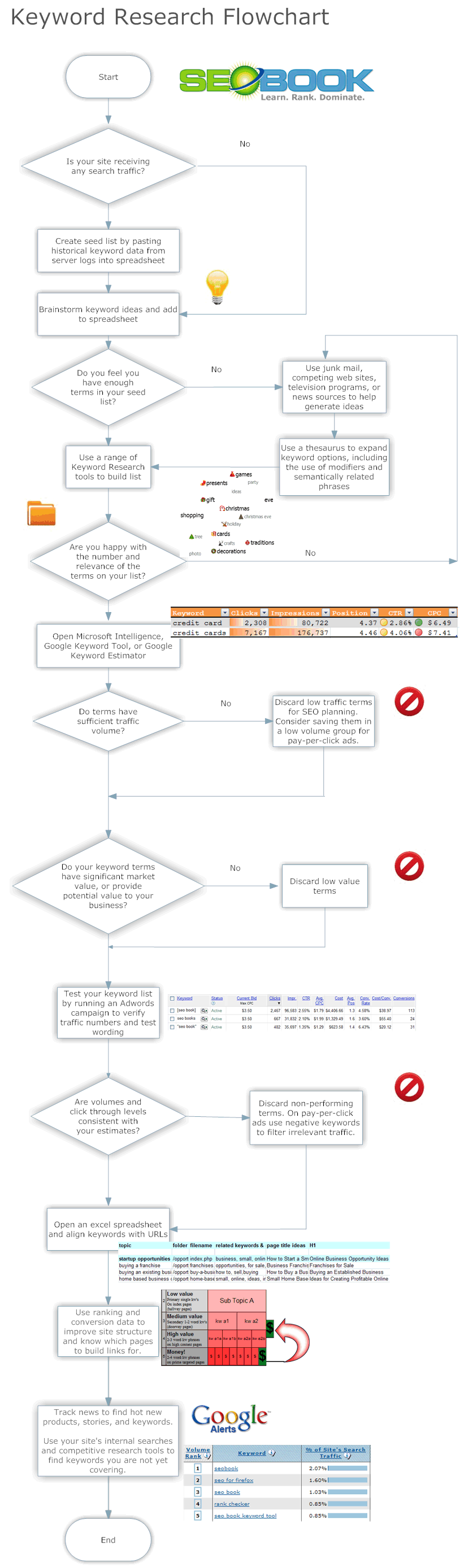
Keyword Research Flowchart

I recently posted a useful SEO Flowchart that Aaron Wall over at SEO Book had put together. While folks found the SEO flowchart useful, it was more of a 'high level' look at the SEO process. The guys over at SEO Book have now put together a VERY useful keword research flowchart that digs down into the deepest of detail. You can see the chart below - and feel free to stop by the SEO Book site for a larger image and PDF download.