Blogger Title Tags Optimization - Update


One of the most popular blog posts ever for the Search Marketing Blog is "Optimizing Title Tags in Blogger" with over 72 comments. The significance behind the post is simple - leverage SEO best practices by transposing your Title Tag to put the name of your blog post first.

There are a few folks using different versions of Blogger which have caused quite a few questions and misunderstandings on how to implement this code hack.

The first thing to realize is this - the suggestion below is, in fact, a hack to your design code. As a result, please make a backup of your existing code prior to making any changes to your layout (simply copying and pasting into a text file will do the trick). You'll need this for future changes to you site layout.

Once the blog title tag optimization code is implemented, moving page elements around will cause the following error
Your template is invalid because the tag 'b:section' appears inside of the tag 'head'
So, to make a long explanation simple, you cannot move page elements around with the title tag hack code in place. So, here is an alternative hack:

1. Delete the corresponding Title tag code: (Press Ctrl+F to find it within the HTML edit window to find it)

Blogger Beta

<title><data:blog.pageTitle/></title>
Blogger Classic Version:
<title><$BlogPageTitle$></title>
2. Then Paste the corresponding title tag code hack ABOVE the head tag

Blogger Beta Version:
<!-- Start Widget-based: Changing the Blogger Title Tag -->
<b:if cond='data:blog.pageType == "item"'>
<b:section id='titleTag'>
<b:widget id='Blog2' locked='false' title='Blog Posts' type='Blog'>
<b:includable id='comments' var='post'/>
<b:includable id='postQuickEdit' var='post'/>
<b:includable id='main' var='top'><title><b:loop values='data:posts' var='post'><b:include data='post' name='post'/></b:loop> ~ <data:blog.title/></title></b:includable>
<b:includable id='backlinkDeleteIcon' var='backlink'/>
<b:includable id='feedLinksBody' var='links'/>
<b:includable id='backlinks' var='post'/>
<b:includable id='status-message'/>
<b:includable id='feedLinks'/>
<b:includable id='nextprev'/>
<b:includable id='commentDeleteIcon' var='comment'/>
<b:includable id='post' var='post'><data:post.title/></b:includable>
</b:widget>
</b:section>
<b:else/>
<title><data:blog.pageTitle/></title>
</b:if>
<!-- End Widget-based: Changing the Blogger Title Tag -->
Blogger Classic Version:
<title><br /><mainorarchivepage><$BlogTitle$></mainorarchivepage><br /><itempage><blogger><$BlogItemTitle$></blogger> - <$BlogTitle$></itempage><br /></title>
Now, moving forward, whenever you want to make a widget or template change, you'll need to make 2 copies of your site code. Save a template with the code and save another template without the code. You can't move page elements around with the code in there so simply replace the hacked code with the original. Make any changes you need and then reapply the hacked code above your tag.

Yes, its an extra step to manage your blog, but the gain in search engine traffic will be worth it!

Top Blog Posts of the Year


Well, its been a while since I wrote a blog post. I've been working hard to get two of my other projects off the ground - Only Facebook and Emarketing Newsletter.

In an effort to start contributing more frequently, I figured I would kick off the New Year right by re-capping the most popular blog posts of 2009. These were measured by re-tweets, diggs, site engagement and incoming links.

Top Blog Posts of 2009:
What are your favorite blog posts of the past year? Leave them in the comments!

SEO and Organic Search Engine Optimization

I’ve had numerous requests to post a synopsis of what makes organic search engine optimization the preferred route to go when building site traffic. While organic seo doesn’t easily lend itself to a quick description (the complexity is what sets it apart from antiquated SEO methods), I put together a brief description.

Organic SEO recognizes the fact that older SEO models don’t work anymore. Instead of aiming for an overnight (and temporary) boost, the organic model uses keyword analysis, strategic inbound linking, on page SEO and a campaign tailored to each client website in order to reach a high position within 90 days and have the site stabilized and firmly entrenched in its higher position within 180 days.

What are your thoughts?

Internet Marketing Maturity Models

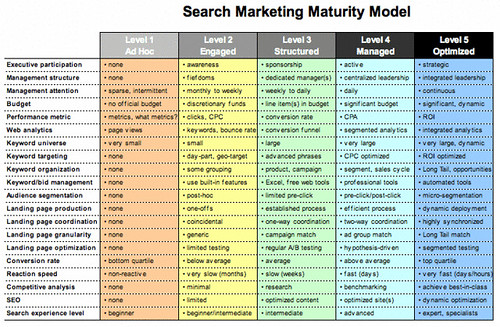
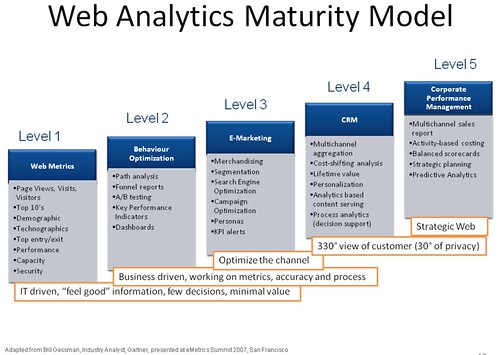
I came across this great search marketing maturity model by ION Interactive and decided to capture all of the available 'maturity models' in one place: search marketing, seo and web analytics.
The benefit of a well-defined maturity model is that it gives practitioners a common framework by which to assess their organization, benchmark it against others, and develop a plan for improvement. Often, there is not just one achievement associated with a particular level, but rather a series of capabilities across several dimensions.
Search Marketing Maturity Model:

Ion Interactive offered this image as a “open source” project so feel free to offer suggestions. Everyone in search could benefit from a common frame of reference that systematically slices up the complexity of search into a logical, unbiased maturity model.

SEO Maturity Model:

This SEO Maturity Model above from Search Enginuity will give you an idea of what makes up each level or stage of the SEO maturity model. Most importantly, this model will show you what to look for within your organization, and how to make the leap to the proceeding stage.

Web Analytics Maturity Model:

Another way to 'read' Gartner's web analytics maturity model presented by Bill Grassman at eMetrics San Francisco is to analyze the vendors themselves in comparison to what they data they can provide. Google Analytics is a level 1, most of level-2 and some of level-3 type of tool. Omniture will cover you up to most of level 4 if you use Test & Target, Discover, Genesis and imports/exports. Level 5 goes beyond web analytics (think Davenport's "Competing on analytics").

Enjoy:)

The Most Powerful Website Directories

A while back I wrote about the top 35 Website Directories for Link Building. As a follow up to that post, I found a great article from Paul Teitelman on the Top 25 Most Powerful Website Directories many of which weren't included in my original list. There are a number of great suggestions in the comments as well.

I thought I would post a few of my new web directory favorites below:

1.) Family Friendly Sites
2.) Incrawler
3.) Ally Web Directory
4.) Kahuki
5.) Greenstalk
6.) Rakcha
7.) Goguides
8.) Biz Lightenment
9.) Enquira
10.) The Librarians’ Internet Index
11.) ALS Links
12.) Info Listings
13.) Skaffe
14.) Premier Business Directory
15.) Dmoz Zilla
16.) Data Spear
17.) World Site Index
18.) Most Popular Sites

Now, if you are looking for the means to find 'do-follow' links, you'll enjoy reading more about the top do-follow link finding tools. As we all know another important factor in link building is analyzing the competition. Check out this link analyzer tool or try a free trial from one of the most popular SEO tools in the marketplace right now - Market Samurai!

Have any favorite directories of you own? Add them in the comments and I'll append to the list!

Update:
A good friend suggested these two additional link building resources:
  1. Strongest Web Directories
  2. How to find .edu links